
Image, Rules, and Records
Assuming the form for the photography workshop is ready, Xiaolin fills in the information, and the page pops up "Registration Successful". Then close the page and check in the backend: Does this data exist? Did the number of available spots go down? Can the same registration number be retrieved?
These results will connect the front-end image, back-end rules, and database. AI assists in writing the program, and once online, the program executes the registration; the general process does not require calling the model for every registration. [1350]] The following will proceed along this hypothetical registration process.
Let’s follow this hypothetical registration from start to finish.
Front-end collects data, back-end makes judgments, database stores records
| Part | Main tasks | Example in the registration system |
|---|---|---|
| Front-end | Display information, collect input, present results | Activity page, name field, submit button |
| Back-end | Verify data, execute rules, and process requests. | Check deadline, quota, and duplicate registrations |
| Database | Save records, maintain data relationships | Activity data, registration number, and registration status |
API is the interface for exchanging data between the two ends. The front-end sends requests according to the agreed format, and the back-end processes and returns the results; which fields are required and what the successful response will be must be written in the same API contract.
Front-end, back-end, and database are division of labor; they can be in the same project or deployed separately. The key is who processes the data and who can access it, rather than necessarily splitting it into three websites.
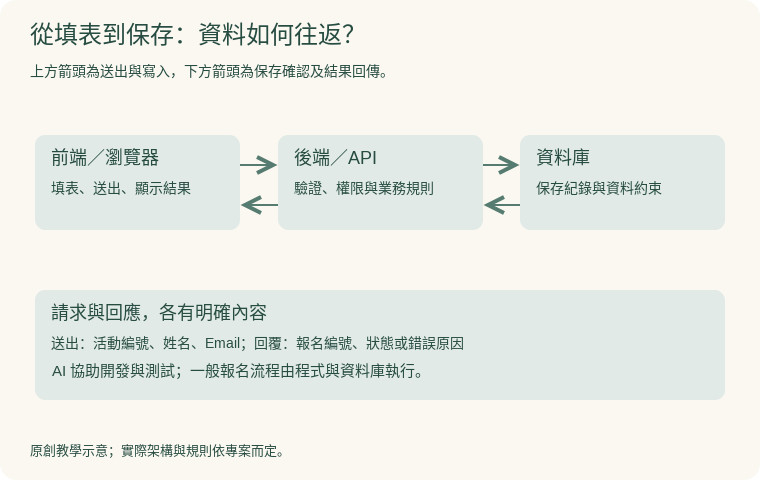
Registration Rules and API Conventions
The number of slots for this workshop, the deadline, whether there is a review process, and whether repeated registration is allowed will all change the data and program. These answers must be decided by the organizer so that the AI has rules to write.
First, divide the data into two groups. Event data includes number, name, time, number of slots, and deadline; registration data includes number, name, email, status, and creation time, then connect them with the event number. The AI can assist in organizing the fields.
If review is required, Xiaolin should receive a "pending review" status. Writing "Confirmed" directly to this status will mislead participants into thinking they have secured a spot, and the program will still cause problems even without an error message.
This step should include:A list of fields, and how to handle success, full, deadline, and duplicate registrations.
The request for adding a registration should be understandable to both ends.
Before adding a record, agree on the format of the request. The following example uses the registration for a photography workshop.
| Item | Illustrated Agreement |
|---|---|
| Request Method and Location | POST /api/registrations |
| Input Fields | eventId、name、email |
| Success Response | Registration Number and Current Status |
| Failed response | Error Code and Understandable Messages |
Here, POST is used to submit new data, and JSON is used to exchange content. Field names, types, and required conditions must be consistent: if the front-end sends the eventId but the back-end reads the activity_id, the connection will fail.
The activity number, name, and email are filled in or selected by Xiaolin; the registration number is created by the back-end. This identification is used for querying and tracking to avoid letting the browser determine the identity of the record in the database.
The same contract is given to AI to generate programs on both ends. If a field is renamed, the program and test must also be changed. Public activity pages and personal registration records have different permissions; non-public endpoints must check permissions every time they receive a request.[1]
Verify Data and Reply with Results
The front-end prompts that the name is required and the email format is incorrect, which can reduce filling errors. However, requests can bypass the form and be sent directly to the back-end, so the back-end must verify again.[2]
The back-end creates a record only after verifying the data, permissions, and registration conditions. The database uses the primary key to identify registration and the foreign key to link to the activity; if duplicate registrations by the same object are not allowed, a uniqueness restriction is added according to the business definition.[3]
Xiaolin and another participant might both find "one spot left" at the same moment. If both check first and then add the spot, they might both pass. This error won't disappear simply by graying out the submit button.
Quota checks and writes require the coordination of transactions and parallel control, such as locking relevant records or performing conditional atomic updates. Transactions allow a group of changes to be completed or reversed together, but the isolation and update methods used will still affect the results of simultaneous submissions.[4]
During acceptance, you should see:Data is saved correctly, submission is within the limit, and failures don't leave a record of incomplete work.
Success screen appears after saving the results.
After the front-end submits, it first displays "processing," then reads the back-end response. When using the browser's fetch() call, an HTTP error status may not trigger exception handling; the program also needs to check response.ok and other information.[5]
| Screen Status | What Participants Need to Know |
|---|---|
| Processing | The system is sending data, please wait. |
| Completed | The registration number and status confirmed by the backend, such as pending review. |
| Needs to be processed | The reason for the problem, the retained input content, and the next steps that can be taken. |
Pressing the button switches to "Registration Successful," which only proves that the screen changes. The registration number and status will only be displayed after the backend confirms and saves the information.
There may be no response online, but the information may have already been written.
The backend saved the registration, but the response was lost during the network interruption. Xiaolin doesn't know the result; if she presses submit again, the system has to determine whether this is a retry or a new registration.
A request identifier can be created for the same submission and reused during retries, allowing the backend to find the saved result. This is the problem that idempotent processing aims to solve: when the same operation is resubmitted, the business effect still occurs only once. Backend storage and parallel control also need to be coordinated; simply generating a number on the frontend is not enough.
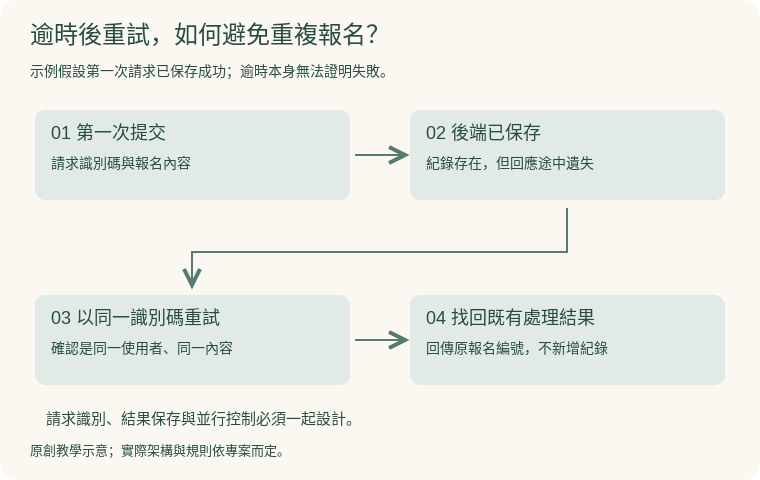
Retrying the same operation and a new registration initiated by the same person should be judged separately. The request identifier should also be bound to the correct user and content; different data cannot be submitted with the same number.
The status of mail should also be recorded separately. If the registration has been established but the email has not been sent, a notification should be sent retroactively; the quota and registration in the database should not disappear as a result.
Complete Acceptance Test in a Formal Environment
The API URL, database connection, login settings, and credentials in the production environment must be checked item by item. Database passwords or high-privilege keys should remain on the server and not be included in the program sent to the browser.
When the front-end and back-end belong to different sources, CORS settings may be required for the browser to read the response. Even if CORS is set up, the back-end still needs to perform identity and permission checks.[6]
List the connections of the development, testing, and production environments in a configuration table. In particular, ensure that test operations do not write to the production client database.
Only by providing AI with actual error messages and environmental differences can clues be found for troubleshooting. Reading procedural code does not prove that the production system is connected to the database.
Test the entire process with the same data.
Use test data to complete the entire process: fill in the form, submit, verify, save, retrieve the number, and then query again. After closing the page, retrieve the same record with appropriate authorization to verify the saving process.
| Test Scenario | Result to be Confirmed |
|---|---|
| Missing Required Fields | Prompt for Problem, Do Not Create Incomplete Records. |
| Duplicate Submission of the Same Operation | Do Not Create Duplicate Registrations. |
| The event has reached its limit or has ended. | Reject or Transfer to Waiting List According to Rules. |
| Reading Someone Else's Record | Backend Rejects Unauthorized Access. |
| Database Temporarily Unavailable | Do Not Display False Success Messages. |
| Retry After Request Timeout | Able to Confirm Results, Avoid Duplicate Processing. |
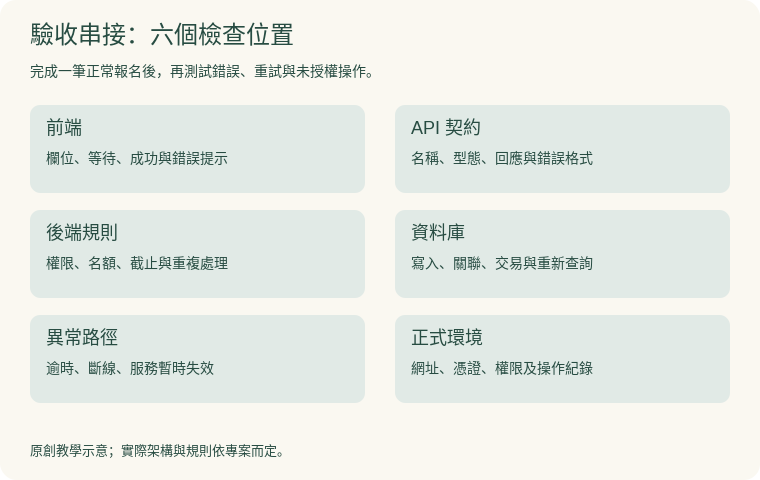
Please have the AI report the actual test results, not just the expected test results. When problems occur, trace them using the request and registration number; avoid leaving passwords, credentials, and unnecessary personal information in the logs.
Example of Delegating to AI
Please create a photography workshop registration function, first listing the data table, API inputs and outputs, and business rules. After the front-end submits the data, it must wait for the back-end to confirm that the data is saved before displaying the registration number and status. Please handle duplicate requests, full slots, deadlines, permission issues, and network timeouts. First, verify in a test environment, reporting the actual test results and incomplete items. List any uncertain rules; do not add them as confirmed requirements yourself.
During acceptance testing, use the registration number to retrieve the previous record and retest for full slots, duplicate submissions, and timeouts. Only with results for these items can you know that the data has actually passed through the entire system.